Boomerit Boomerang Video Maker
- 4.6
- Rating
- 1.00M
- Installs
- Free
- Price

 Analysis by App-foxy
Making a short looping video can sound like a tiny task, but the usual camera app often leaves you trimming clips, searching for a loop effect, and trying to make the ending meet the beginning. Boomerit Boomerang Video Maker is built around removing that extra work. I found it most useful when I wanted a quick, playful clip for social media rather than a fully edited video with titles, transitions, and a carefully arranged soundtrack.
The app sits in the video players and editors category, but its purpose is much narrower than a full mobile editing suite. That focus is its main appeal. Instead of presenting a crowded timeline and a long list of tools, it aims to get you from a short recording to a repeatable boomerang-style result with very little fuss. The developer is Cubetix Ltd., and the app is free to install, with optional in-app purchases ranging from $0.49 to $49.99 per item.
My overall impression is that it works best as a quick creative utility. It is not the app I would choose for a polished product video, a travel montage, or a project that needs detailed control over sound and timing. For a reaction, outfit reveal, pet movement, food presentation, or small moment with a natural back-and-forth action, it is much more approachable than a general-purpose editor.
You May Also Like

 Blood Strike: 2.5 Anniversary
Blood Strike’s Loadouts Turn Every Drop Into a Tactical Gamble
A close look at Blood Strike’s custom loadouts: how fast access to signature weapons reshapes its battle royale rhythm, rewards preparation, and narrows the gap between fights.

 Pandora - Music & Podcasts
Pandora’s Music Is Easy to Start, but Harder to Recover
Pandora’s strength is its low-effort path from a seed to a station. Its weak spot is how much confidence it asks you to place in connection, setup, and quiet recovery.

 8 Ball Pool
 Is Built on Rivalries, Rematches, and Routine
A close look at the rivalries, rematches, shared routines, and unanswered safety questions that turn a quick pool match into a persistent mobile community.

 Samsung Music
’s Quiet Strength Is Playing What You Already Own
Its reach comes less from spectacle than from dependable access to a personal library. That simplicity is both the app’s strongest retention engine and its ceiling.

 AccuWeather: Weather Radar
AccuWeather Review: A Quick, Clear Forecast for Everyday Decisions
For everyday plans, the best forecast is the one you can understand quickly. AccuWeather makes rain timing, radar, and local conditions easy to act on, with a few trade-offs.

 Hill Climb Racing
Why Hill Climb Racing Still Turns Crashes Into One More Run
A tiny car, a bumpy hill and one more upgrade: Hill Climb Racing keeps resurfacing because its simple chaos makes every near-miss feel personal.
More From Our News Desk



What to expect before making your first boomerang
The first thing to understand is the app’s role. Boomerit is not trying to replace a complete camera or editing package. Its strength is turning a compact visual action into a loop that plays forward and backward, creating the familiar boomerang rhythm. That makes the result feel more animated than an ordinary short clip, even when the original movement is simple.
The store summary highlights instant creation, social-media use, and no watermark. In practical terms, that combination matters. A watermark can make a casual clip look unfinished, especially when the video is mostly intended to stand on its own. Removing that distraction gives the exported result a cleaner appearance, although the visual quality will still depend heavily on the lighting, stability, and framing of the original recording.
The app has an average rating of 4.6 from around 35 thousand ratings, and it has passed one million installs. Those figures suggest that the simple concept has broad appeal, but they should not be read as proof that it suits every editing habit. People who want control over individual frames, layered effects, advanced audio work, or precise export settings will probably feel restricted by a focused boomerang tool.
I would recommend it first to someone who normally avoids video editing because the process feels complicated. It is also a sensible choice for a parent who wants to make a playful clip quickly, a social-media user who prefers spontaneous posts, or a beginner experimenting with motion. If you already use a powerful editor comfortably, the advantage is less about capability and more about speed.
One useful way to think about the app is as a finishing tool for a single idea. Before opening it, decide what movement you want the viewer to notice. A quick turn toward the camera, a jump, a hand gesture, a splash, or a small object moving into place can all work. A clip with no clear change may technically loop, but it will not feel particularly satisfying.
Choosing a scene that loops well
My best results came from actions with a distinct beginning and end. If the subject starts still, moves clearly, and briefly returns toward the starting position, the forward-and-reverse playback feels intentional. Movements that are too slow can lose energy, while movements that happen at the edge of the frame can look abrupt when repeated.
Try to leave visual space around the moving subject. A person jumping near the top of the frame may be cut off by the phone’s composition, and a hand entering from the side can become distracting when the motion reverses. A stable background also helps the loop read as a deliberate effect instead of a shaky recording.
Lighting deserves more attention than beginners often expect. A boomerang repeats changes in brightness and motion, so flickering lights or a subject moving between strong shadows can make the repetition look uneven. Natural, consistent light is usually the safest starting point. If you are filming indoors, place the subject where the face or main object remains visible throughout the action.
There is also a social-media consideration: a loop is easier to understand when its central action is visible without sound. That makes expressive movement, texture, and timing more important than dialogue. If the point of your video depends on spoken words or a long explanation, a standard video editor will be a better match.
From installation to a meaningful first result
I start with the setup question that matters most: what would make a first result feel worth keeping? For me, it is a short, centered action with a clear return, not a complicated scene. That simple target also makes it easier to notice which choices are mine during creation and which details deserve a careful check before I move on to the trust and control questions.
Setting up without overthinking the process
Boomerit is free, and it is rated for Everyone, so it is approachable for a wide range of users. It was released on October 25, 2020, and the current version is 3.0.5. The listed minimum operating system is Android 7.0, which makes it accessible on many older Android phones as well as newer devices. On an iPhone or iPad, the exact installation experience naturally depends on the platform’s own store and system requirements.
When I begin with a focused app like this, I avoid trying to learn every screen at once. I first open the app, look for the main path to create a video, and prepare one short test scene. That approach is less frustrating than importing a precious clip immediately. A test recording lets you see how the app handles the movement, playback, and saving process before you commit to a more carefully staged moment.
Keep the first attempt simple. Place the phone on a stable surface or hold it with both hands, choose one subject, and make one obvious movement. Do not start with a group scene, a dim room, or an action that crosses the entire frame. The goal is not to produce your most impressive clip immediately; it is to learn the rhythm that the app produces from your footage.
If the app offers a choice between recording and using existing media on your device, I would start with a fresh recording for the first success. A new clip makes it easier to control the framing and movement. After that, trying an existing video becomes more useful because you already understand what kind of source footage gives the cleanest result.
Making the first successful action
For a reliable first attempt, frame a person or object in the middle of the screen. Begin with a short pause, perform one clear action, and finish without immediately moving the phone away. That small pause at both ends gives the loop some breathing room and makes the reversal less jarring.
A practical example is an outfit reveal. Stand still facing the camera, turn your body or bring a jacket into view, and hold the final position for a moment before stopping. When the clip reverses, the movement back toward the starting pose feels natural. The same method works for raising a cup, tossing a soft item slightly upward, turning a page, or letting a pet look toward the camera.
After creating the boomerang, watch it more than once before saving or sharing. On the first viewing, people tend to judge whether the idea is fun. On the second, look for technical distractions: a finger over the lens, a sudden camera shake, a subject leaving the frame, or a background object that becomes oddly prominent during the reverse movement.
The most important beginner tip is to design the movement for the reversal, not just for the original recording. A normal short video can end anywhere because it simply stops. A boomerang has to travel back through the same action, so a movement that looks fine forward may look awkward when repeated in reverse. Small, centered, readable gestures are usually more successful than complicated choreography.
Once the result looks right, save it in the format and location the app provides, then check the finished file in your phone’s gallery before posting. This extra check is worthwhile because the version you preview inside an editor is not always the version you will see in another social app. Looking at the saved result also confirms that the clip is available for later use rather than only visible inside the editing screen.
Understanding the common points of confusion
New users sometimes expect a boomerang maker to behave like a normal video editor. That expectation can make the app seem limited when it is actually staying focused. If you are searching for a multi-track timeline, extensive text controls, detailed color correction, or a full audio workflow, you are looking at the wrong type of tool. Boomerit is designed around the loop itself.
Another common issue is judging a recording by its original length. A longer source does not automatically create a better boomerang. Too much dead time can make the repeated action feel slow, while a very brief action may become hard to follow. I would rather record several intentional short attempts than rely on one long take and hope the useful moment appears somewhere inside it.
It is also easy to mistake camera movement for energy. A shaky phone can make a loop feel chaotic because the entire background moves forward and backward along with the subject. If you want the action to feel lively, keep the camera steady and let the subject provide the motion. Even leaning the phone against a mug, shelf, or small stand can improve the result during a casual indoor recording.
The absence of a watermark is helpful, but it does not remove every reason to review a clip before sharing. Check whether the subject is comfortable being recorded, whether private details appear in the background, and whether the framing reveals more than intended. A clean-looking export can still contain information you did not mean to publish.
In-app purchases are available, from $0.49 to $49.99 per item. Since the app is free to start, I would use the basic workflow first and decide whether any optional purchase addresses a real need. I would not pay simply because a creation screen contains an upgrade prompt. For occasional social posts, the free experience may be enough; frequent creators should examine what an optional item actually changes before spending.
Where it fits beside ordinary alternatives
The most obvious alternative is the regular phone camera. A camera app is better when you want to preserve the original video, capture sound as part of the moment, or decide later how to edit the footage. Boomerit is better when the loop is the point and you want to avoid manually reversing and arranging the clip yourself.
A full editor offers more creative freedom. You can normally trim with greater precision, add multiple clips, adjust speed, place text, work with music, and build a complete story. That flexibility comes at the cost of more decisions. For a single playful action, opening a large editor can feel like using a workshop to tighten one screw. Boomerit’s narrower workflow is valuable precisely because it does not ask you to build an entire project.
Social platforms may also include their own boomerang-style tools. Those are convenient if you are already creating directly inside a particular network, but a dedicated app can be preferable when you want to prepare the clip separately, keep a clean copy, or decide later where to publish it. The trade-off is that a platform’s built-in tool may connect more naturally to its posting process, while a separate app gives you a more independent creation step.
For a first-time user, I would choose Boomerit over a full editor when the desired result can be described in one sentence: “I want this short action to play forward and backward.” I would skip it in favor of a general editor when the sentence becomes: “I want several clips, captions, music, transitions, and careful timing.” That distinction prevents disappointment and makes the app’s simplicity feel like an advantage rather than a missing feature.
Practical workflows beyond the first experiment
One workflow I found useful is making a small collection of reusable reaction clips. Instead of filming only when a post is already planned, record a few clear gestures in good light: a surprised look, a wave, a turn, or a quick celebratory movement. Save the results and use them later when a message or social post needs a visual response. This works especially well because a boomerang can communicate mood without requiring spoken commentary.
Another idea is to use the app for documenting a small change over time, but with a single repeated action rather than a formal before-and-after presentation. For example, you might show a desk becoming organized through a quick hand movement or reveal a decorated corner by turning toward it. The trick is to keep the transformation visually simple. If too much changes between the beginning and end, the reverse playback can make the scene difficult to read.
You can also use the app as a planning aid for better phone cinematography. Record the same action with a fixed camera, then repeat it with a gentle camera move and compare the results. The version with the most stable framing will often feel more polished, even if the action itself is identical. This is a useful lesson for beginners because it shows that editing cannot fully repair careless capture.
For pets and children, timing is the main trade-off. A natural moment may be more charming than a perfectly framed one, but unpredictable movement can produce a messy loop. I would keep the phone ready, use a wide enough composition to allow movement, and accept that several attempts may be needed. Avoid directing a child or animal into an action that could be unsafe merely to create a better clip.
For small businesses or independent sellers, the app may help create a quick visual detail: a package opening, a product turning, a fabric moving, or a simple demonstration of texture. It is not a substitute for a complete promotional edit, but it can add variety to a feed. Keep the product large enough to recognize and avoid backgrounds that compete with it when the motion reverses.
When the app is not the right choice
I would not choose Boomerit for an instructional video where the viewer needs to follow a sequence in one direction. Reversing the action can confuse the order of steps. The same applies to cooking demonstrations, repairs, workouts with safety instructions, and anything that depends on spoken explanation. In those cases, a conventional video with trimming and narration is more responsible and easier to understand.
I would also look elsewhere if export control is central to your work. Professional or semi-professional creators may need exact dimensions, frame rates, compression choices, audio mixing, or color adjustments. A specialized boomerang app can save time for simple posts, but it should not be mistaken for a production environment.
People who dislike repeated motion may find the effect distracting rather than entertaining. A boomerang draws attention to a gesture by repeating it, so subtle movements can become exaggerated. If your subject looks uncomfortable on the return pass, use the original clip instead. The goal is not to force every moment into a loop.
Finally, users with older or less capable phones should be patient during creation and saving. The minimum Android requirement is 7.0, but meeting a system requirement does not guarantee identical performance on every device. Keep the first test short, close unnecessary apps if the phone feels strained, and verify the saved result before deleting the original recording.
My recommendation after using the full workflow
Boomerit Boomerang Video Maker succeeds because it keeps one creative task understandable. From the first setup, the path is reassuring: choose a simple action, record with stable framing, review the forward-and-back movement, and save the result. That is a much gentler introduction to mobile video than dropping a beginner into a complex timeline.
I especially like the no-watermark approach for casual sharing, and I appreciate that the app’s purpose is immediately clear. The biggest limitation is also the clearest: its value depends on wanting a boomerang. If you need broader editing control, the app will feel narrow rather than efficient. Optional purchases also mean that free installation does not necessarily mean every possible capability is included, so I would inspect any paid option before committing.
My advice to a first-time user is to make the first clip deliberately ordinary. Film a centered gesture in steady light, leave a brief pause at both ends, and watch the saved result twice. Once you understand how the reversal changes the feel of movement, you can experiment with pets, outfits, products, reactions, and small reveals. That learning curve is short, and the payoff is immediate when the action meets itself cleanly.
For me, this is a useful little editor rather than an all-purpose video solution. It earns a place on an Android phone when I want a quick, clean looping clip without building a project from scratch. If that matches what you need, the free starting point makes it easy to try. If your goal is a narrated, multi-scene, highly controlled production, choose a fuller editor instead and keep Boomerit for the moments where simplicity is exactly the point.
FAQs for Boomerit Boomerang Video Maker
01What is Boomerit Boomerang Video Maker, and what can I use it for?
Boomerit Boomerang Video Maker is designed for creating short looping videos from clips recorded with your phone or selected from your gallery. It can turn everyday moments into repeating forward-and-back animations that work well for social media posts, stories, and messaging. Before downloading, remember that the available editing tools, export options, and supported formats may vary depending on your device and app version.
02How do I create a boomerang video with Boomerit?
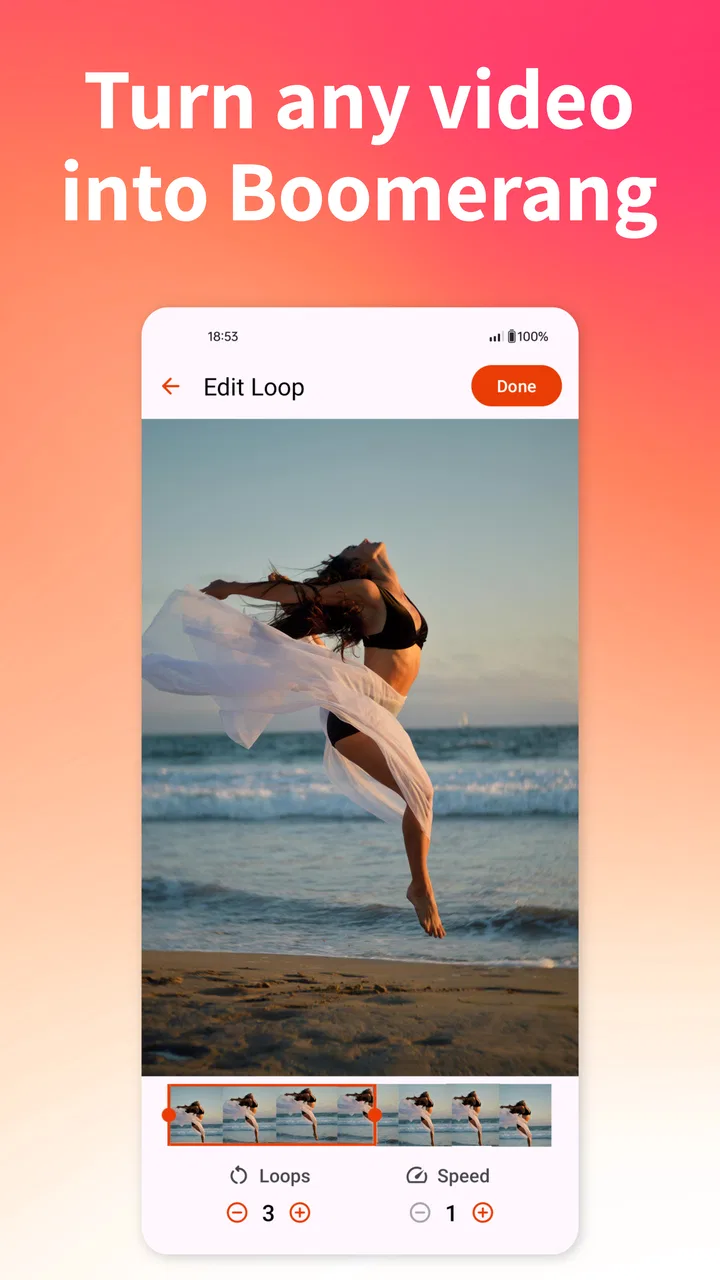
After opening the app, you generally choose an existing video or record a new clip, then select the portion you want to animate. Boomerit processes the footage into a forward-and-reverse loop, and you can usually preview the result before saving or sharing it. Short, steady clips with clear movement tend to produce the smoothest and most attractive boomerang effects.
03Does Boomerit Boomerang Video Maker add a watermark or reduce video quality?
The exported result may depend on the version of the application and the tools selected during editing. Some free video makers include branding, advertisements, or limitations on resolution, while premium options may provide cleaner exports or additional controls. Check the export preview and the app’s current store description before creating important content, especially if you need watermark-free or high-resolution videos.
04Is Boomerit Boomerang Video Maker free to download and use?
The application may be available to install at no initial cost, but free access can include advertising, restricted features, or optional in-app purchases. Paid upgrades may unlock extra effects, remove advertisements, or provide additional export choices. Pricing and subscription terms can change, so review the Google Play Store or Apple App Store listing carefully before confirming any purchase or recurring payment.
05What permissions and devices are required to use Boomerit?
Boomerit may request access to your camera, microphone, photos, or local media files so you can record and import videos. Camera and microphone permissions are typically needed only for recording, while photo access is required for selecting clips from your device. Compatibility can differ across Android and iOS versions, so verify the app’s current requirements and privacy information before installation.
Pros
- Simple controls make creating boomerang clips quick for beginners.
- Lets you turn existing videos into looping boomerang-style clips.
- Useful trimming tools help select the most interesting moment.
- Exports are convenient for sharing on social media platforms.
- The looping effect works well for short
- energetic everyday moments.
Cons
- Advanced editing options are limited compared with full video editors.
- Some exports may include branding or require in-app purchases.
- Longer source videos can take extra time to process and export.
- Results depend heavily on having a steady
- well-timed original clip.
- Frequent effects or export use may be restricted in the free version.

Boomerit Boomerang Video Maker
Gallery